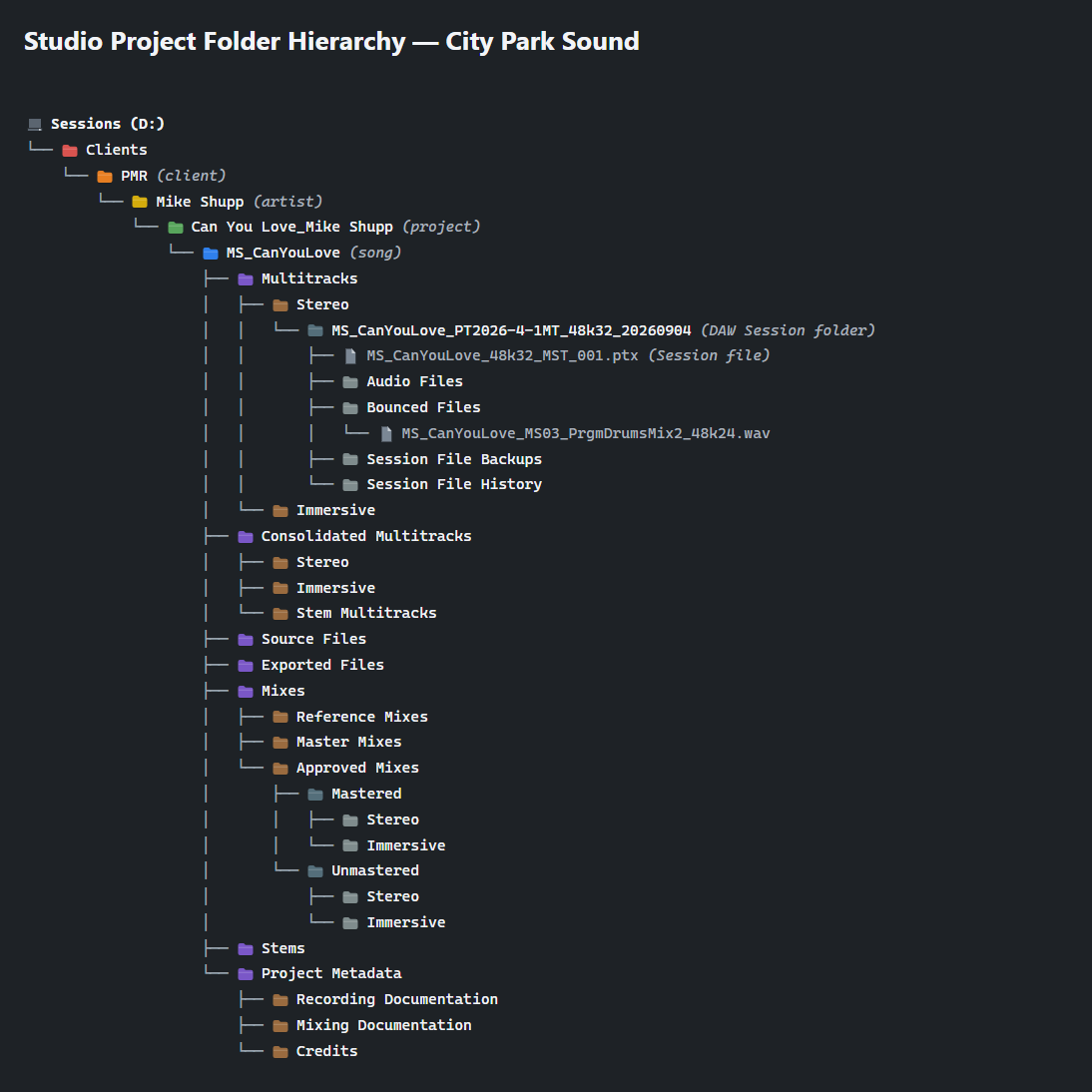
The organization of any project is essential, and it’s especially important for the file management of a music recording session using a modern DAW (digital audio workstation). Here are some thoughts and examples from my current organization philosophy, which is modified and personalized from the technical guidelines at The Recording Academy’s P&E Wing.
I have a general, top-level folder structure already in place, and then use a Windows batch file (or shell script on Mac) to auto-create the bulk of the project-specific folder hierarchy I want, and then create the DAW session within the appropriate folder.
File and folder naming conventions are the key principle in maintaining clarity, consistency, and portability across recording sessions. The guidance for allowable characters for file naming is to use only ASCII letters, digits, underscores, and hyphens—and nothing else. No spaces, special characters or other punctuation. This is intended to support long-term archival readability, accurate searching and tracking across distribution systems, and overall file safety, compatibility, and standardization.
Using Avid Pro Tools®, for me the next most important consideration in file and folder naming conventions is the naming of the DAW session folder, the DAW session file itself, and any deliverable audio files, such as a stereo WAV file of the final mix. The conventions I’m currently using are:
For the DAW session file, I use a shortened naming convention compared with its containing session folder, and then append “MST” to identify it as the main, current working session file. Only this current session file remains visible in the root of the DAW session folder; any previous “Save As…” working versions are moved to a manually created Session File History folder. I also append a three-digit numerical revision number—001, 002, 003, and so on—to track successive versions of the session file.
Although you are unlikely to ever exceed the common 255-character file name limit, it is much easier to encounter MAX_PATH-related file path limitations, particularly when working within applications and deeply nested folder structures. For example, Pro Tools® Auto Backup adds a “Session File Backups” folder to the path and then creates backup files using the full session file name plus the “.bak.00x.ptx” suffix. Depending on the session name and folder structure, this can easily add 40, 50, or more characters to the overall file path… so plan accordingly.
Here is a screenshot of an example folder hierarchy, and a video showing the batch file auto-create most of the session folder structure: